

You open your Google Ads dashboard and the spend is climbing. Clicks are coming in. Impressions look fine. But the conversions column? Zero. Or close enough to zero that it hurts.
This is one of the most common problems in paid advertising, and it’s fixable once you find the cause. The trick is knowing where to look first, because checking the wrong things in the wrong order is how people burn even more budget.
This post walks through ten checks, in diagnostic order: the cheapest checks that tell you the most come first. This guide assumes a Search campaign; Check 5 covers Performance Max.
Quick diagnosis: where should you start?
Not sure which check matches your situation? Use this as a shortcut.
| What you’re seeing | What to check first | Start with |
|---|---|---|
| Plenty of clicks, zero conversions recorded | Tracking, then conversion lag | Check 1 |
| Conversions recorded, but no real leads or sales | Which action counts as a conversion | Check 2 |
| Clicks from searches that look unrelated | Search terms and match types | Checks 3 and 4 |
| Good traffic, people leave immediately | Landing page and offer | Checks 6 and 7 |
| Leads come in but don’t turn into customers | Follow-up speed and lead quality | Check 7 |
| Campaign is brand new | Tracking, then data volume | Checks 1 and 10 |
Before you change anything
One warning before the checklist. Don’t judge a campaign on a handful of clicks, and don’t change five settings at once. If you do, you won’t know what helped and what hurt. Google’s bidding systems also need time to learn, so a campaign that’s only a few days old may simply need more data. Make one change at a time where you can, write down what you changed and when, and give it a fair stretch before deciding it worked or didn’t.
Now, the checks.
Part 1: Is your measurement broken?
1. Your conversion tracking isn’t working (or is set up wrong)
Start here. If tracking is broken, every other number in your account is misleading, and you could fix the wrong things for weeks.
A few things to confirm:
- Is the tag firing? Use Google Tag Assistant or Tag Manager’s preview mode to test the conversion event yourself. Submit your own form or complete a test purchase and see whether it registers.
- Is it tracking the right action? A common mistake is firing the conversion on the form page instead of the thank-you page, which counts every visitor instead of every submission.
- Are there duplicate tags? Two tags firing for one action inflate your numbers and can make a bad campaign look good.
- Are calls and form submissions both covered? If many of your leads phone you, a form-only setup makes results look worse than they are.
- Is it conversion lag? Conversions are credited to the day of the click, so recent clicks can show zero for days or weeks. Check the time lag report in Google Ads’ attribution tools to see how long your customers take to convert. With data-driven attribution you may also see fractional conversions like 0.5. That isn’t an error.
- Is your tracking modern enough? Enhanced conversions improve measurement by matching hashed customer data such as email. For lead generation, offline conversion import sends closed deals from your CRM back to Google, so bidding learns from real customers and not just form fills. If you target the EEA or UK, check your consent setup too, since missing consent signals can reduce measured conversions.
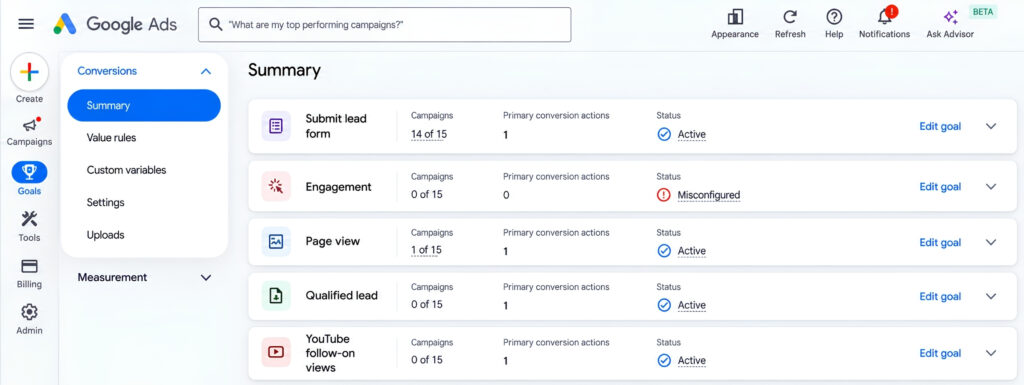
If your account shows the status “No recent conversions” or “Inactive,” that’s your first clue that something isn’t wired up properly.
2. You’re optimizing for the wrong conversion
If tracking works, the next question is what exactly you’re counting as a conversion.
Some accounts count things like page views, scrolls, or button clicks as conversions. The dashboard looks healthy, but none of it pays the bills. Worse, if you’re using Smart Bidding, Google optimizes toward whatever you’ve labeled a conversion. If that’s a low-value action, it will happily find you more of the wrong people.
Ask yourself: is each conversion action tied to something that actually matters to the business, like a qualified lead, a purchase, or a booked call? If not, set the weak actions to secondary so they don’t steer your bidding.
Part 2: Are you paying for the wrong traffic?
3. Irrelevant search terms are eating your budget
Open the Search Terms report and sort by cost. Take a slow look at what people actually typed before clicking your ads.
It can be uncomfortable. You’ll often find searches that have nothing to do with what you sell: job seekers, free-stuff hunters, students doing research, or just oddly unrelated queries that Google decided were “close enough.”
The fix is to add negative keywords. Start with the obvious ones for your industry (words like “free,” “jobs,” or “DIY” if they don’t fit your offer) and keep adding as new irrelevant terms show up. Make it a habit, not a one-time cleanup. On a campaign with meaningful spend, check every day or two for the first couple of weeks, then weekly once the obvious junk is blocked.
4. Your keyword match types don’t match your intent
Whether broad match is safe depends on your bidding. Paired with Smart Bidding (such as Maximize Conversions) and enough conversion data, it can find relevant searches you wouldn’t think to add. Paired with manual bidding or Maximize Clicks, or with very little conversion data, it tends to pull in loosely related traffic and burn budget.
If you’re seeing irrelevant clicks, consider tightening up with phrase or exact match for your core keywords, at least while you gather data. It’s also worth asking whether your keywords reflect buying intent. Someone searching “how does X work” is researching. Someone searching “X pricing” or “buy X near me” is much closer to acting.
5. Your targeting settings are off
This one catches people out more than you’d think, because the defaults aren’t always what you want. Check these:
- Location: In the campaign’s location settings, “Presence” targets people physically in or regularly in your area, while “Presence or interest” also includes people who show interest in it. The second can send traffic from places you never meant to reach. Confirm the option names in your interface, since Google renames settings now and then.
- Devices: If your landing page is clunky on mobile, you’re paying for mobile clicks that never had a chance to convert.
- Networks: Check whether Search Partners or Display expansion is on without you realizing it.
- Campaign type: Performance Max gives you far less control over search terms and match types. There, waste usually comes from weak conversion goals, weak audience signals, too many asset groups splitting your data, and URL expansion sending traffic to pages you didn’t choose.
It takes five minutes to review and can save a surprising amount of money.
Part 3: Does the click turn into a customer?
6. Your landing page doesn’t match the ad
Imagine clicking an ad that promises “Same-day plumbing repair” and landing on a generic homepage with six different services and a contact form buried at the bottom. You’d leave, right?
Your visitors do the same. Look at your landing page the way a stranger would:
- Does the headline match what the ad promised?
- Does it load quickly on a phone? (Test it on mobile data, not just your office wifi.)
- Is the next step obvious within a few seconds?
- Does the form actually work? Test it. You’d be surprised how often it doesn’t.
If your tracking and traffic check out, the landing page is the next suspect.
7. Your offer is weak, or your follow-up is slow
Sometimes the page is fine and the traffic is fine, but the offer just isn’t compelling enough. “Contact us” asks a lot from a stranger. A free quote, a short audit, a trial, or a clear next step with low commitment tends to ask for less.
Also think about friction. Every extra form field is a reason to leave. If you’re asking for ten pieces of information to get a first conversation going, try cutting it down to what you truly need.
Then there’s what happens after the form. Slow follow-up can sink campaigns that look fine inside Google Ads: leads wait for hours, go cold, or go to the competitor who answered first. Submit your own form and time the first reply. If it’s longer than you’d be happy to wait yourself, fix that before spending more on ads.
8. Your ad copy attracts the wrong clicks
A high click-through rate isn’t always a good thing. If your ad is vague or overly broad, you’ll get curious clicks from people who were never going to buy.
Make your ads more specific. If you’re not the cheapest option, don’t imply you are. If you serve a particular type of customer, say so. Price ranges, qualifiers and “who it’s for” will usually lower your click-through rate, and with it the Expected CTR part of your Quality Score. But the clicks you keep are more likely to convert. Judge ads by cost per conversion, not by CTR.
Part 4: Is the account set up to succeed?
9. Your budget, bidding, or schedule is working against you
A few things to look at here:
- Bidding strategy: Conversion-based automated bidding needs a steady flow of conversions to learn from (see how automation is changing PPC). A commonly used rule of thumb is a daily budget of roughly 3 to 5 times your target cost per conversion. That’s a practitioner heuristic, not a Google rule, so check it against Google’s current guidance. With almost no data, some advertisers start with Maximize Clicks plus a max CPC cap to collect data, and others go straight to Maximize Conversions. The first optimizes for clicks, not conversions, so switch once data builds up.
- Budget spread: Several campaigns on a small budget leave each one starved of data. Fewer, more focused campaigns often work better.
- Ad schedule: Check whether the budget runs out early in the day, and whether your business can answer leads when the ads show.
- Unit economics: Cost per conversion = CPC ÷ conversion rate. A $2 CPC with a 2% conversion rate costs $100 per conversion. If a conversion is worth less than that to you, no setting will fix it. The campaign is priced wrong.
- Auto-applied recommendations: Check the Recommendations tab and your auto-apply settings. Auto-applied changes can alter budgets, keywords or bidding without you touching anything. Defaults differ by account, so confirm in Google’s current documentation.
10. It might just be too early (or too little data)
Sometimes there’s no bug to find. A new campaign, a small budget, or a low-traffic niche can mean a few clicks and no conversions simply because the sample is too small to tell you anything.
If your campaign is only a few days old, or has had only a small number of clicks, resist the urge to tear everything down. Check that tracking works (Check 1), make sure the basics are in place, and give it time to gather data before making big decisions. Here’s a sanity check. If your real conversion rate is 3%, the chance of getting zero conversions in 30 clicks is about 40%, in 50 clicks about 22%, and in 100 clicks about 5%. So 30 clicks with nothing tells you very little, while 100 clicks with nothing means something is probably broken. A second rule of thumb: once you’ve spent 2 to 3 times your target cost per lead with zero conversions, start investigating.
A 30-minute audit order you can follow today
If you only have half an hour, here’s the order I’d go in:
- Test your conversion tracking end to end.
- Review the Search Terms report and add negatives.
- Check your location, device, and network settings.
- Load your landing page on your phone and submit the form.
- Review your bidding strategy and budget against how much data the account has.
Those five steps cover the cheapest, most informative checks first.
Common mistakes when fixing a struggling campaign
- Changing everything at once. You lose the ability to see what worked.
- Pausing too fast. You may cut off a campaign before it had a fair chance (see Check 10).
Final thoughts
Wasted ad spend is frustrating, but it’s rarely a mystery without a cause. Start with tracking, clean up the traffic you’re paying for, make sure the page and offer give visitors a reason to act, and give the campaign enough time and data to prove itself.
Work through the checks one at a time, and you’ll likely find the leak.
FAQs